Thursday, March 27, 2014

KiCad ho!

(Yes I know that "ho!" in this context is an improper use of the word. It's an interjection that is used to call attention to a destination and not an object --- source)

If they were the same price, I would pay for Eagle, but they are not.  Eagle is $315/year or $830 for a lifetime license, whereas KiCad is generously offered at no charge under GNU GPL v2 free of charge licensing.

KiCad - available at www.kicad-pcb.org
Eagle - free for hobbyists is available at www.cadsoftusa.com

That difference is reflected in the layout and integration of the two different products.

Eagle:


  • The layout of the various Eagle windows is what one would expect from a professional pre-ribbon styled Windows application. 
  • It's interface is mouse focused, which I prefer as I occasionally work on layouts on my tablet.
  • The integration between windows in a project is great - update the schematics and the layout will reflect that change

KiCad


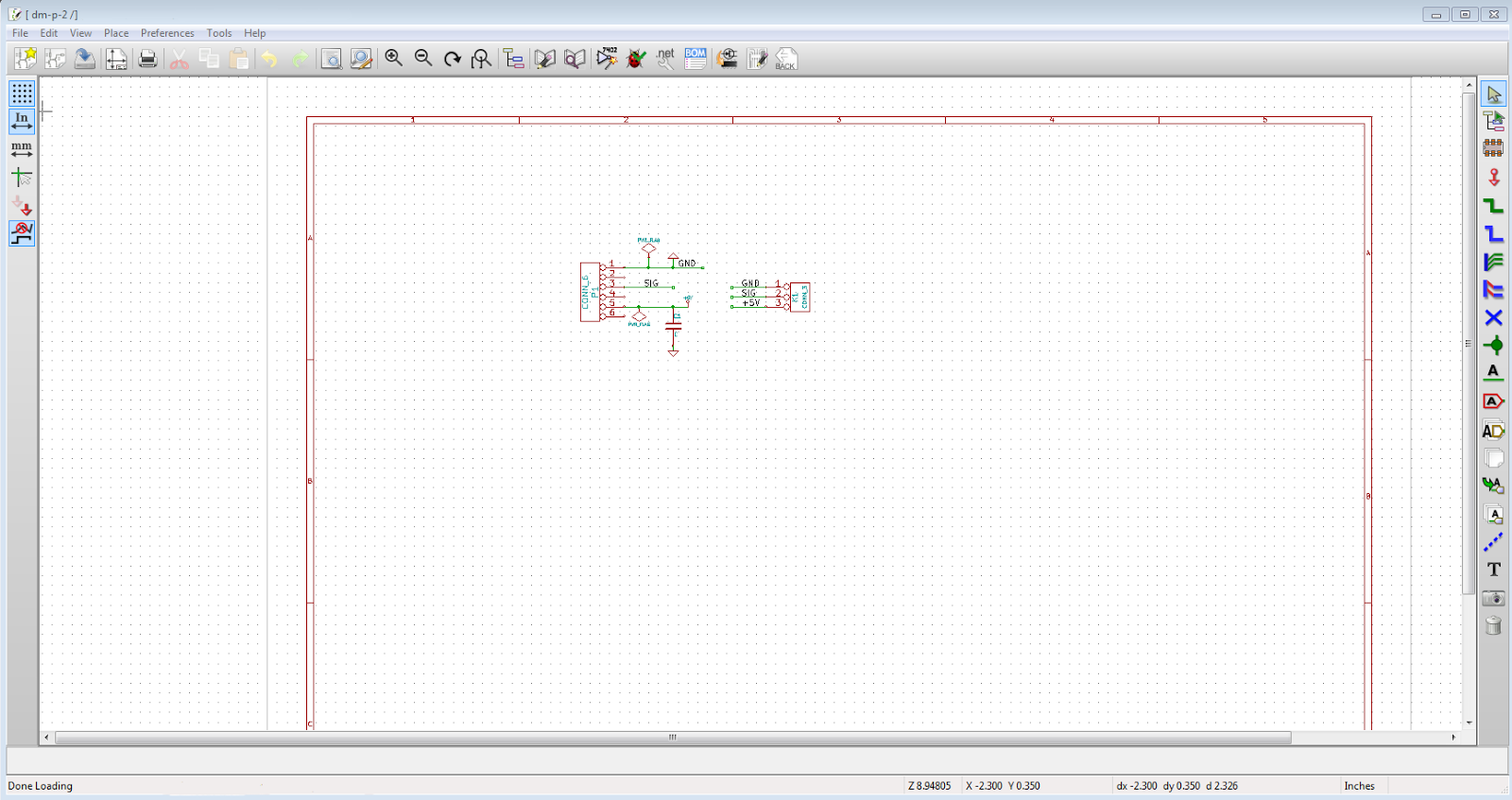
  • KiCad's icons and palette selection looks less "professional" 
  • The interface comes alive when used with keyboard shortcuts, but is labourious when only using a mouse -- nearly useless on my tablet. 
  • There's no automatic integration the schematics and layout - you need to export the Net list, update the footprints then import that into the PCB editor.


That said I'm starting to warm up to KiCad. To me, it's not as polished as Eagle, but once you get used to it and understand the flow, and are in front of a keyboard, you can quickly get things accomplished.

So after a week or so I give KiCad a thumbs up. Factor in the price, then it's 2 thumbs and 2 large toes up!

Wednesday, March 19, 2014

It shouldn't be this hard .... (part III)

Just when you thought it was safe to go back into VS....

(Part II here)

All I did was add some scaffolled OData controllers, added all my tables to the WebApi.Config and pressed F5.

Could not load file or assembly 'System.Web.Http, Version=5.0.0.0, Culture=neutral, PublicKeyToken=31bf3856ad364e35' or one of its dependencies. The located assembly's manifest definition does not match the assembly reference. (Exception from HRESULT: 0x80131040)


Line 35:             config.Routes.MapODataRoute("odata", "odata", builder.GetEdmModel());
Line 36: 
Line 37:         }

Really?

The build output has this:
1>  Consider app.config remapping of assembly "System.Net.Http.Formatting, Culture=neutral, PublicKeyToken=31bf3856ad364e35" from Version "5.0.0.0" [] to Version "5.1.0.0" [D:\Lieb-Tech\packages\Microsoft.AspNet.WebApi.Client.5.1.1\lib\net45\System.Net.Http.Formatting.dll] to solve conflict and get rid of warning.

1>  Consider app.config remapping of assembly "System.Web.Http, Culture=neutral, PublicKeyToken=31bf3856ad364e35" from Version "5.0.0.0" [] to Version "5.1.0.0" [D:\Lieb-Tech\packages\Microsoft.AspNet.WebApi.Core.5.1.1\lib\net45\System.Web.Http.dll] to solve conflict and get rid of warning.

1) There's no app.config, as this is a web project.
2) Why not provide some link to a help document to explain this issue?

.NET is like a box of chocolates. Can't wait until I get the next dependancy/version/etc error.


It shouldn't be this hard .... (part II)

Couldn't stay away from this for too long.

(Part I here)

I deleted the folder and started over.

1) Started VS as administrator
2) Created Web API Project without a test project
3) Compiled right away and it worked!
4) Updated all packages via NuGet
5) Compiled and it still worked!
6) Added my EDMX model again (had to do the Azure path all over again)
7) Compiled and it still works!
8) Chcked in the code into TFS

9) On a different computer I cheked out the code.
10) Compiled and it didn ... no it worked!
11) I hit F5 and .... NOOOOOOOOOOOOOOOO!!!!!!!!!

Could not load file or assembly 'Newtonsoft.Json, Version=4.5.0.0, Culture=neutral, PublicKeyToken=30ad4fe6b2a6aeed' or one of its dependencies. The located assembly's manifest definition does not match the assembly reference. (Exception from HRESULT: 0x80131040)


12) This time the web.config fix worked

      <dependentAssembly>
        <assemblyIdentity name="Newtonsoft.Json" publicKeyToken="30ad4fe6b2a6aeed" culture="neutral" />
        <bindingRedirect oldVersion="0.0.0.0-6.0.0.0" newVersion="6.0.0.0" />
      </dependentAssembly>

Again ... I thought that .NET was supposed to fix all this! As there are more and more versions, it seems to be worse than ever before. It's such a fragile system.

Alot of good things are coming out of Microsoft lately -- so far Azure ROCKS!!!! So hopefully all this will be worked out as well. Part of the issue is the lack of transparancy -- who knows where these references are coming from.


It shouldn't be this hard .... (part I)

So I'm ready to start playing with OData and WebAPI to be a backend for my services.

Story version -- it shouldn't be this hard. .NET was supposed to fix the version issues with DLLs - seems like it swapped one set of headaches for another.

Long version:

1) Created new ASP.NET Web Application project in Visual Studio 2013
2) Selected MVC & Web API + test project with no authentication
3) Added to TFS (as it's an internal project; drivers and other code with be on Git)
4) Updated all NuGet Packages (I installed VS about 1 hour before starting this trek) - there were 2 pages listed
5) Imported my Azure Subscriptions
5) Right clicked on Models and selected Add -> ADO.NET Entity Data Model
6) Had to go to my Azure management page to get my DB info, even though I did the import on step 5
7) Entered my Azure SQL DB info.
8) Screen showed that EntityFramework 6 couldn't be selected as my project referenced an older version. No option to install now via NuGet -- only to continue with an older version or cancel and start over. So I cancelled out of the dialog.

NuGet manager is showing that EntityFramework is available for installation. Even though EF5 is installed, NuGet is not showing that.

9) Installed EF6 via NuGet.
10) Start the DB model over again (glad that it remembered my Azure settings)
11) Now there's no longer a selection screen for EF version, just right to selecting my objects - selected all and kept the default options.
12) Compiled the project for the first time and I get this error:

Assembly 'xxxx, Version=1.0.0.0, Culture=neutral, PublicKeyToken=null' uses 'System.Web.Http, Version=5.1.0.0, Culture=neutral, PublicKeyToken=31bf3856ad364e35' which has a higher version than referenced assembly 'System.Web.Http, Version=5.0.0.0, Culture=neutral, PublicKeyToken=31bf3856ad364e35'

Mind you I didn't nothing in NuGet or anywhere else to select a version for System.Web.Http

13) Went to Add Reference to see if I can find a 5.1 version of System.Web.Http, and there's only 4.0.0.0 listed under extensions.
14) Found there's a version of Microsoft.AspNet.WebApi.WebHost that's version 5.1.1
15) Going back to Package Manager, it shows that I've got that installed already ... hmmm.
16) So I add this to the Web.Config:

<dependentAssembly>
<assemblyIdentity name="System.Web.Http" publicKeyToken="31bf3856ad364e35" />
<bindingRedirect oldVersion="5.0.0.0-5.1.1.0" newVersion="5.1.1.0" />
</dependentAssembly>

17) Compile again and same failure. So at this point I've added nothing that wasn't Microsoft generated and it can't compile. All I've added is EF6 via NuGet and built my ADO.NET model.

I'm sure you can sense the increasing frustration ....

18) I tried to PM>  install-package microsoft.aspnet.webapi.webhost -version 5.1.1.0 - and of course it says that it's already installed.
19) Let's re-install all packages: PM> Update-Package -Reinstall

Still won't compile. Really?!?!?

20) The Reference to System.Web.Http is to version 5.1.0.0

21) Back to Web.Config and added the assembly:
  <system.web>
<compilation debug="true" targetFramework="4.5" >
<assemblies>
<add assembly="System.Web.Http, Version=5.0.0.0, Culture=neutral, PublicKeyToken=31bf3856ad364e35"/>
</assemblies>
</compilation>
    <httpRuntime targetFramework="4.5" />
  </system.web>

Guess what ... still won't compile.

Going to walk away from this, as I'm getting nowhere.


Busy times

From the top of my mind, this is what I've got going on ...

1) Waiting on new modules to come back from OSHPark.com
2) Waiting on order from Mouser.com to test new connectors (see previous post)
3) Learning KiCad to replace Eagle (set previous post)
4) Configure BizSpark items
5) Learn about the cool stuff in hosting websites and SQL in Azure - never used it.
6) Continue working on SQL schemas for multiple projects
7) Select between on Web.API / OData
8) Continue laying out hardware designs that are in process
9) Research parts for new designs (as there always seems to be 10 chips to do what you want)
10) Curse Microsoft for the Framework Hell (which has replaced DLL Hell of days of yore)
11) Layout client interfaces for store & project management site
12) Waiting on parts from Mouser.com for new project
13) Continue working on software drivers for modules in process

This list is painting in very broad strokes, and many of the items can be broken out to many sub-items.

But it's fun! The whole raison d'etre for Lieb-Tech is for me to learn things and hopefully help others out with what I've learned.

So I say keep it coming!!


Tuesday, March 18, 2014

A little toasty

I've got so much to learn about this whole process, so I dove right in! 


Duke Nukem from the GHI forums wanted a Gadgeteer Module to connect multiple MaxBotix ultrasonic distance sensors to a mainboard. After some research and designing I came up with my DistoMatic line. I'll discuss these boards a little later on when I have more to show off.

I found connectors which I liked and that were surface mount, and bought some. Putting the cables together was an adventure for another post. In all my research, I neglected to check if they were compatible with non-leaded solder temperature profiles. 

They were not. 

You can see the discoloration when compared to the raw sockets on the left. Also the right most connector is slightly melted - the walls should be perpendicular.


So more research and testing is needed. Lesson learned is that I have much still to learn! But this all part of the learning process I expected. 

Here's a quick overview of my current process.

1 - Prep

I've only used OSHPark.com for my boards thus far so I can't compare, but I've been rather pleased with the results. They provide 3 boards at $5 sq inch, so quite reasonable for prototyping. The ordering process is very easy, all you do is upload your .brd file, they show a preview of the different layers, and then can order it.

Fresh board from OSHPark.com

2 - Apply solder paste.

I submitted my design to OSHStensils.com and in a few days the post man brought me a 3mm stencil to apply the paste. In each order, they also include a plastic business sized card to spread it. The board is being held in place by their Acrylic Stencil Jig ($6) - figured it was the same thickness of the PCB, so it would be useful.


With paste applied

3 - Place the components

The capacitors were placed with a angled tweezers and the sockets were placed by hand. If some of the paste gets smudged by moving the parts, it's ok, within reason. The board has a layer that prevents the solder from sticking to the purple areas, so it adheres only to the exposed pads.

Notice the paste is still gray and all the pads are fully covered 

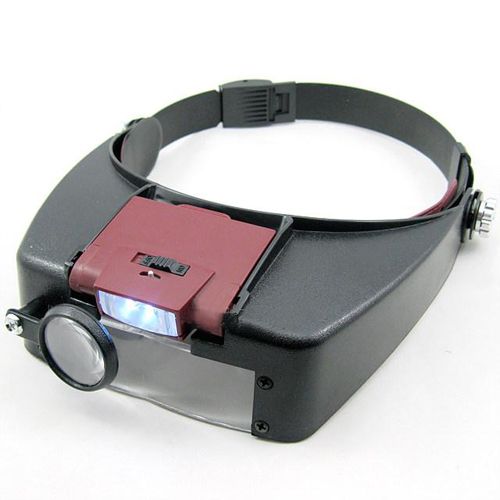
Because the 0603 components are beyond tiny, I got a visor magnifier from ebay for about $8.


4 - Bake 'em

My first attempt for these boards was on #6 (as that worked well on my previous attempts). But the sockets came out brown and slightly misshaped.


Attempt 2 was on profile #3, hoping that the short time at max temp would be ok. Not so much...


Friday, March 14, 2014

Go with what you know - at first

To start off Lieb-Tech modules will be focused on Microsoft Gadgeteer & .NETMF. Why?


  1. Comfort - been a MS .NET developer since version 1.0 days.
  2. Ecosystem 
    1. Visual Studio is a great IDE on it's own. 
    2. Setting breakpoints and getting real-time insight into values without debug.print() makes me happy.
  3. GHI - they've been great supporters for these platforms.
  4. Platforms - I love the Gadgeteer way of quickly building devices and want to (hopefully) help others to do the same.

They may not be the sexy or current platforms, but all together these make for a great system to work with.

But I do plan on expanding to supporting more.

  1. Arduino - very flexible and I view it as a distant cousin to .NET MF/Gadgeteer
    1. Not done much professionally with C/C++, so that will be a part of the learning curve
  2. RaspPi - can't beat the price for what you get - great processing power and connectivity 
    1. Not thrilled with having to deal with Linux and Python/Ruby/etc.
    2. Not thrilled with having to with hardware through an OS layer
  3. BeagleBone (see RaspPi)


These present challenges for me, but also opportunities to learn and broaden the scope of my abilities. I always felt that being at least familiar with similar technologies helps to be better at what you are working on at the moment.